
H5 Integration Guide
Overview
When you need to embed our pages (such as image recognition report pages), it's necessary to correctly implement a signature-based authentication mechanism to ensure the security of API calls. Please read the following sections carefully to understand the integration process.
Use Cases
- Using hybrid development frameworks like React Native or Flutter to integrate our H5 pages through WebView components (suitable for cross-platform app development)
- Using native Android or iOS development to load our H5 pages through system WebView (suitable for native app development)
- Embedding our H5 pages dynamically through
<iframe>or<script>in your own H5 pages (suitable for pure web applications)
Overall Flow
Taking App embedded H5 as an example: 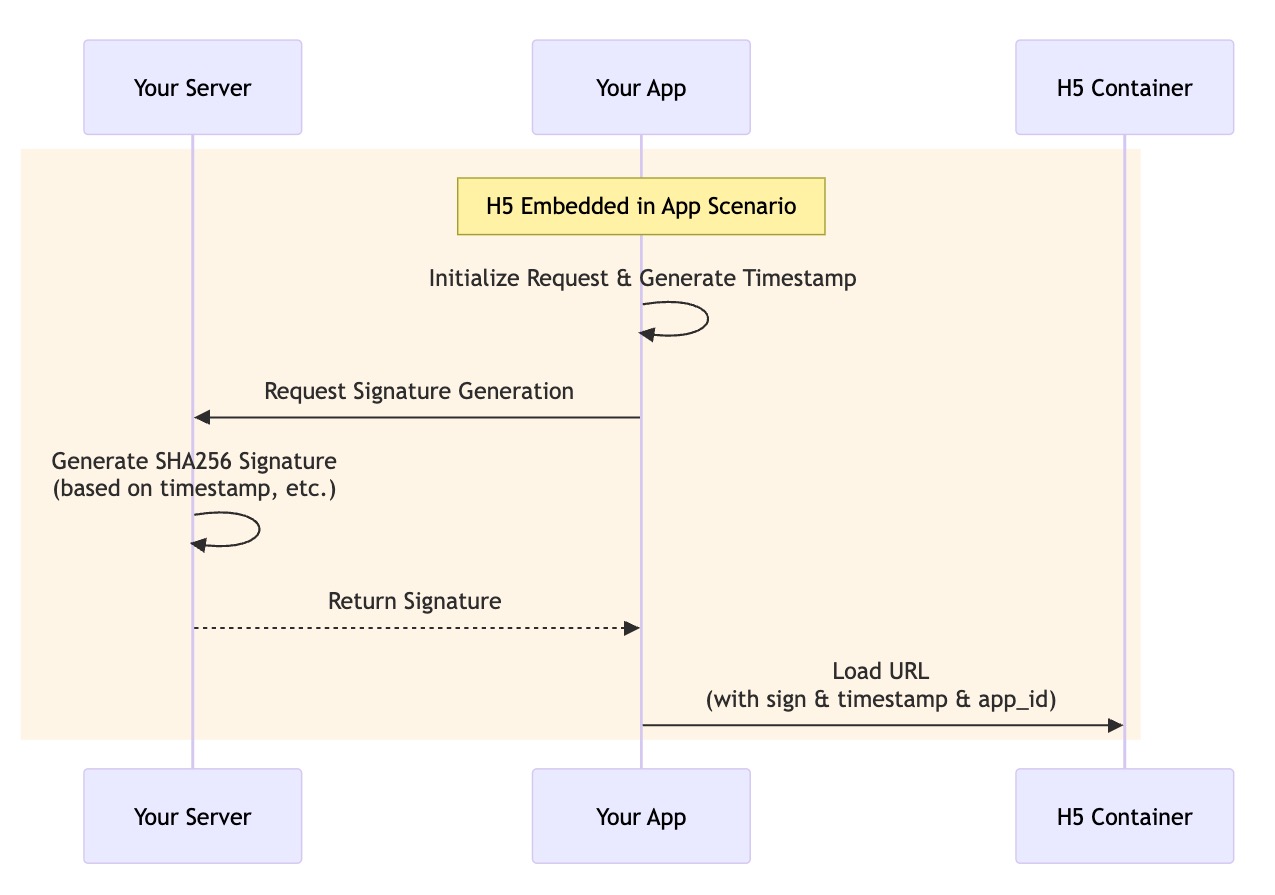
Request Parameters
| Parameter | Type | Required | Description |
|---|---|---|---|
| sign | string | Yes | Signature calculated using APPID and APPSECRET for symmetric encryption signature calculation |
| appId | string | Yes | The APPID value used by the caller to invoke the API |
| timestamp | long | Yes | Request timestamp in seconds, timezone must be set to UTC |
| Other params | ... | No | Additional parameters based on specific business scenarios |
Note:
timestampis the current timestamp of the request. Do not modify thetimestampvalue arbitrarily. The server will determine if the request has expired based on whether thetimestampvalue exceeds 60s from the current time, which helps prevent potential replay attacks.signshould be generated on the server side to ensure the secret key is not exposed to the client.- The
valuein parameters should be a URL-encoded string. For example,https://google.comis encoded ashttps%3A%2F%2Fgoogle.com
Signature Calculation
The signature calculation formula is as follows:
Signature = Base64(HMAC-SHA256(APPSECRET, StringToSign))Here, StringToSign refers to the signature string that needs to be constructed, with the following format:
- Split all request parameters into
key=valuepairs. - Sort the keys in ascending lexicographical order (a-z), then concatenate them into a single string using
&, for example:appId=85206f97-2f4f-4b6e-8830-f3f4ec6fd6ae&language=zh_CN&taskId=8127919×tamp=1745923427
Note: The value in parameters should be a URL-encoded string. For example, https://google.com should be encoded as https%3A%2F%2Fgoogle.com.
Example
Suppose we have an APPID and APPSECRET pair:
{
    "app_id": "85206f97-2f4f-4b6e-8830-f3f4ec6fd6ae",
    "app_secret": "c6ae8924a68a5d839947a7885894dfe4"
}
Request Example
H5 URL is http://127.0.0.1:8080/report
- Business parameters:
{
    "language": "zh_CN",
    "taskId": "8127919"
}- Generated
StringToSign:
appId=85206f97-2f4f-4b6e-8830-f3f4ec6fd6ae&language=zh_CN&taskId=8127919×tamp=1745923427- Calculate
Signature:
Calculate using Base64(HMAC-SHA256(APPSECRET, StringToSign))
Signature = vuINPfgYzMKuR4C8oIvWchE0cJjIWSUN38nKEXU7ico=- Final URL:
http://127.0.0.1:8080/report?language=zh_CN&taskId=8127919×tamp=1745923427&appId=85206f97-2f4f-4b6e-8830-f3f4ec6fd6ae&sign=vuINPfgYzMKuR4C8oIvWchE0cJjIWSUN38nKEXU7ico=